AI photos
Why AI product photos often look fake, and how to spot it before your customers do
The small things that make an AI product photo look fake, from light and shadows to labels and edges, and a simple way to check your own photos.
By JL, Founder

Most people can’t explain why an AI product photo looks fake, but they notice it anyway. Something about the light feels off, or the product seems to float, or the label on the bottle doesn’t quite read, and the buyer starts to wonder whether the product itself looks anything like the picture.
That doubt is the real cost. Sellers on forums and marketplaces say the same thing again and again: they like how quickly AI can make lifestyle photos, but they worry that a photo which looks fake will make their whole store look cheap or untrustworthy.
The good news is that the things that give an AI photo away are fairly predictable. Once you know what to look for, you can check your own photos in a couple of minutes and catch most problems before a customer ever sees them. This guide goes through the most common signs, gives you a short checklist, and ends with a few ways to get more realistic results from the start.
Why AI product photos look fake in the first place
A real photo is a record of one moment, so everything in it agrees with everything else. The light comes from one place, every shadow falls the same way, and the product sits on the table because it really was on the table.
An AI image is made differently. The model draws a picture that looks believable overall, but it has no real scene to check against, so small parts of the picture can disagree with each other. A shadow might point the wrong way, a reflection might show a room that isn’t there, or the product might be lit from the left while the rest of the scene is lit from the right. Each problem is small on its own, but our eyes are very good at noticing when a scene doesn’t add up, even when we can’t say exactly why.
Products make this harder, because buyers look at them closely. A slightly odd tree in the background hardly matters, but a label with a missing letter or a bottle cap with the wrong shape is exactly the kind of thing a buyer zooms in on.

The signs to look for
These are the problems that come up most often. You don’t need to be a photographer to spot them, but you do need to look at the photo slowly and at full size rather than as a thumbnail.
Light and shadows that don’t agree
Start with the light. Work out where it’s coming from by finding the brightest side of the product, then check that its shadow falls on the opposite side and is as soft or as sharp as the other shadows in the scene. A product with a hard shadow in a scene full of soft ones, or with no shadow at all, is one of the quickest giveaways.
Reflections and see-through materials
Glass, metal, gloss and liquid are hard for AI because they show the scene around them. A glass bottle should let a little of the background show through, and a shiny surface should reflect the light that’s actually in the scene. In the example above you can see the texture of the sand through the glass and the liquid, which helps it read as one photo. When a bottle looks like a flat sticker on top of the background, or a metal watch reflects a window that doesn’t exist, buyers feel that something is wrong.
A size that doesn’t make sense
AI doesn’t know how big your product really is, so it sometimes makes a candle the size of a vase or a ring the size of a coin. Compare the product with the things around it, like a hand, a cup or a chair, and ask whether the size matches what the buyer will receive. Getting this wrong is worse than looking fake, because it sets the wrong expectation for the parcel that arrives.
Text, logos and fine detail
Small text is the part AI gets wrong most often. Letters can blur, change or turn into shapes that only look like writing, and logos can lose small parts. Prints and patterns can also come out simpler than they really are, even when the overall design looks right at first glance.
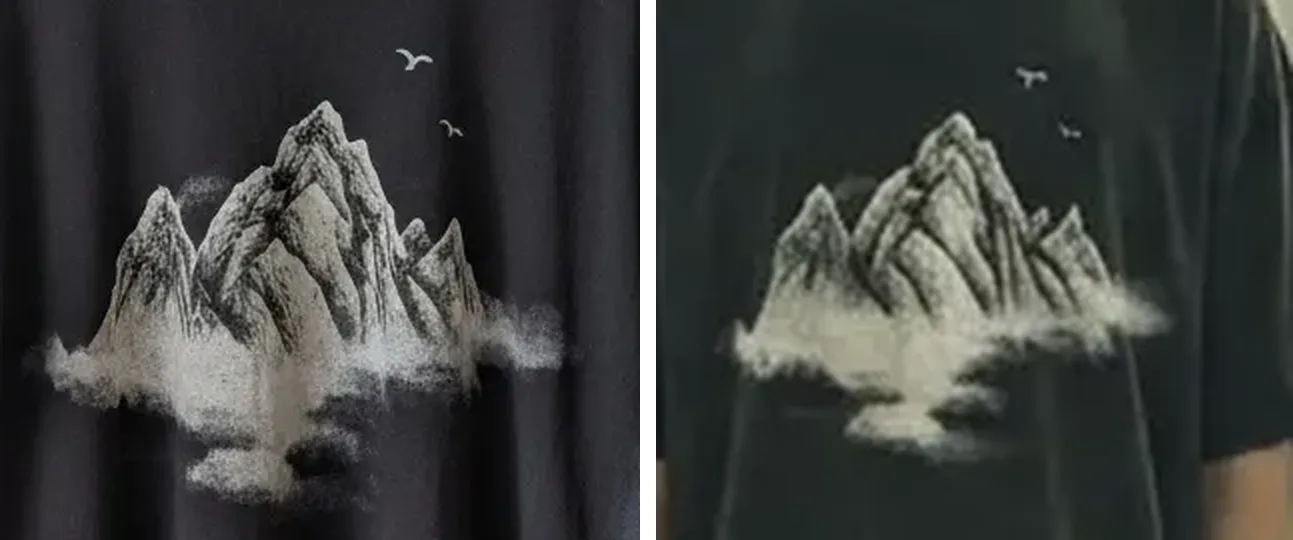
Read every word on your product letter by letter, and compare logos, prints and patterns with the real thing side by side. If the text matters, for example because it’s your brand name or an ingredient list, don’t publish a photo where it has changed.
Edges and contact with surfaces
Look closely at the places where the product meets the rest of the scene. A soft halo around the edges, a product that seems to hover slightly above the table, or a base that sinks into a surface it should be resting on are all signs that the product was placed into the picture rather than photographed there.
Hands, people and fabric
If a person is holding or wearing your product, check the hands first, because fingers are still a weak spot for AI. With clothing, check that the fabric folds and hangs the way that material really would, and that the fit matches what the buyer will get rather than an idealised version of it.
Scenes that are too perfect
Some photos look fake simply because nothing in them is out of place. Perfectly smooth surfaces, flawless symmetry and a glow that seems to come from nowhere make a picture look like an advert for a product that doesn’t exist. A bit of natural texture, like a crease in a tablecloth or the grain in a wooden table, often makes a scene more believable.
A two-minute check for every photo
Before an AI photo goes on your product page or into an ad, run through these questions with the photo open at full size and, if you can, the real product in front of you.
- Where is the light coming from, and does the product’s shadow fall the same way as every other shadow?
- Does the product touch the surface it’s sitting on, without a halo around its edges?
- Is the size right compared with the things around it?
- Is the colour the same as the real product when you hold it next to the screen?
- Is every word, logo and pattern exactly as it is on the product?
- If there’s glass, metal or liquid, does it show the scene around it?
- If there are hands or people in the photo, do they look natural?
- Would a buyer who saw only this photo be surprised by what arrives?
If the answer to the last question is yes, don’t use the photo, however good it looks otherwise. A slightly less exciting photo that matches the product will do far more for your store than a beautiful one that leads to returns.

How to get more realistic results from the start
Checking catches problems, but a few habits make them less likely to happen in the first place.
- Upload a sharp, well-lit photo of your product, because the AI can only keep details it can actually see.
- Show the whole product in your upload, so that nothing has to be guessed or invented.
- Choose a scene whose light suits your product. A glossy bottle looks most natural in soft, directional light, while a matte product is easier to place almost anywhere.
- Match the angle, so that a product photographed from the front goes into a scene that was shot from the front.
- Pick a scene where your product is a sensible size in the frame, since the smaller it appears, the less detail there is to hold on to, especially for text.
- Start from a finished photo where you can. When the light, the shadows and the composition already come from one photo, there are fewer things for the AI to invent and fewer places for them to disagree.

When a real photo is the better choice
AI photos work best for lifestyle and mood shots, where the job is to show the product in use and help buyers imagine owning it. For the photo that shows exactly what someone is buying, which is usually the first image on the page, a real photo of the actual product is often the safer choice, and some marketplaces require one. Check the rules of the platform you sell on, and keep at least one honest photo of the real product on every page.
It also helps to tell buyers when photos have been made or edited with AI, for example with a short note in the product description. Being open about it builds more trust than hoping nobody notices.
Summary
AI product photos look fake when parts of the picture disagree with each other, such as light and shadows that don’t match, glass that doesn’t show its surroundings, or text that has quietly changed. Checking each photo at full size against the real product catches most of these problems, and starting from a clear upload and a scene that suits your product prevents many of them.
This is also why we built Clickdrop around finished template photos. It’s prompt-free AI product photography, so you pick a product photo you like, upload your product, and get that same photo back with your product in it, with the light, the angle and the composition already settled by the photo you chose.

